How On-Device AI Can Help Your Business Move Faster and Protect What Matters
AI conversations usually revolve around massive cloud platforms and big, future-facing ideas. But for most small and mid-sized businesses, the challenge is much more practical:
How can AI help improve my day-to-day operations without adding complexity, slowing teams down, or introducing new security concerns?
It’s a fair question. Your business doesn’t need large-scale AI deployments that claim to revolutionize work in public cloud environments. You just need a trustworthy solution that makes work better.
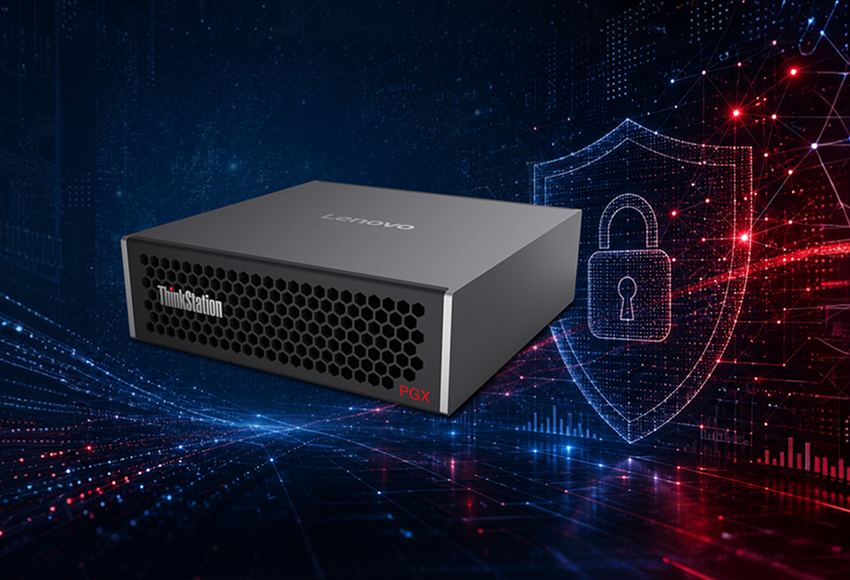
This is where an easy-to-deploy, localized AI solution like Lenovo ThinkStation PGX SFF (Small Form Factor) can help.
This professional workstation for engineers is Lenovo’s first dedicated to AI development and deployment. Combining the latest NVIDIA® Superchip technology with a compact desktop design, this small yet mighty CAD workstation PC is engineered to tackle AI computations and model development with ease.
What does that look like in practice?
At Fast Computers, we know practical outcomes speak louder than theoretical hype. So, rather than listing off the selling points, allow us to share the use cases.
If you’d like to learn more about local AI or schedule a product demo at any point, contact us here.
Why Local AI Matters: Real-World Use Cases
Many businesses use AI-powered tools for transcription, document analysis, and workflow automation. However, there is growing concern around data security in AI platforms.
Public platforms are just that, public. This heightens risk for any organization, especially those handling financial data, patient records, sensitive contracts, or intellectual property.
Local AI solutions offer a different approach.
The Lenovo ThinkStation PGX SFF, for example, comes preloaded with an NVIDIA® software stack for on-device AI development, eliminating the concern and added costs associated with cloud-based solutions. This high-performance workstation delivers enterprise-grade reliability with its preconfigured AI software, reducing setup time and enabling faster transitions from experimentation to real workloads.
Running AI workloads internally means your team can explore automation and productivity tools without losing control over sensitive data. In other words, localized AI creates opportunities to experiment with new technology in a way that feels manageable and secure.
Let’s look at a few use case examples.
Internal Knowledge Search
Struggling with information scattered across shared drives, PDFs, emails, and project folders?
On-device AI can help your teams quickly search internal documentation without exposing sensitive information.
This makes it easy for:
- A construction and engineering firm to reference past projects before a new build.
- A financial institution to streamline support documentation for loan applications.
- A warehouse manager to centralize SOPs and technical manuals for easy access.
- A legal team to review internal contracts and records before a deposition.
The Lenovo ThinkStation PGX SFF is powered by the latest high-performance computing technology for AI computing directly on the desktop. This enables faster indexing, semantic search, natural language querying, and analysis of large internal datasets without relying entirely on cloud infrastructure.
Document Storage and Processing
If your business handles large contracts, multi-page agreements, or legal paperwork, your team probably spends significant time on repetitive review tasks.
Secure, on-device AI can give teams some of this time back by:
- Processing invoices to maintain cash flow.
- Summarizing contracts before client meetings.
- Checking compliance standards regularly.
- Transcribing meetings for future reference.
- Categorizing customer support claims to identify product or service gaps.
The Lenovo ThinkStation PGX SFF includes access to Lenovo AI Developer and NVIDIA® AI Workbench, along with guided playbooks and AI tools, at no additional cost. This helps IT and data teams create customized internal search applications, automate document analysis, and streamline enterprise knowledge management workflows using prebuilt AI frameworks and workflows.
Product Design and Engineering
Lenovo’s high-performance workstation for CAD portfolio has long supported design and engineering workloads. The ThinkStation PGX SFF extends that capability into AI-enhanced workflows for development, simulation, and analysis.
Potential use cases include:
- Optimizing CAD workflows quickly and easily.
- Visualizing support journeys for the best customer experience.
- Preparing simulations to demonstrate a new product or prototype before launch.
- Analyzing technical data quickly to inform decision-making.
- Iterating designs faster so teams can focus on the big picture.
This workstation for 3D modeling offers a secure sandbox for prototyping AI models and freeing up resources for production. This streamlines workflows, keeps IP on-premises, and reduces security risks, making ThinkStation PGX SFF ideal for experimenting without compromising your data security standards.
Start Small with a Hands-On Demonstration
One of the biggest misconceptions about AI is that you need a massive strategy to get started.
It’s simply not the case. Fast Computers works directly with organizations like yours to evaluate workloads, configure solutions, and ensure AI initiatives align with existing infrastructure and security policies. We’ve seen many successful projects begin with small improvements focused on practical outcomes such as data security, workflow integration, operational efficiency, and infrastructure scalability.
If you’re interested in learning more about how on-device AI might fit into your environment, Fast Computers can help. We’ll work with you to evaluate your needs and demonstrate how Lenovo ThinkStation PGX SFF can work in your real business scenarios.
Connect with our team today to get started.